Online Compass: Find True North Instantly
Online Compass is a free digital compass that shows your heading in degrees and direction using your device's sensors. Find magnetic north, use your position to correct for true north, and mark a bearing directly in your browser.
Live readings need a compatible phone or tablet. On a desktop, use the location-based tools below. No download required.
Your position
Share your position to convert magnetic bearings to true north and see the local field.
More free navigation tools
Qibla Direction
Great-circle bearing to the Kaaba in Mecca from your location.
My Location
Current latitude, longitude, altitude, and reported location accuracy.
Speedometer
Live device-reported GPS speed in km/h, mph, and metres per second.
Bubble Level
Check side-to-side and front-to-back tilt with a digital spirit level.
Sun & Moon Compass
Find north from the sun or moon. No magnetometer required.
Magnetic Declination
Convert magnetic bearings to true bearings using the WMM2025 model.
Need help reading a bearing or checking your phone? Browse the navigation guides.
How the live Online compass works
This direction compass reads orientation data supplied by your browser. A compatible phone combines its magnetometer with other motion sensors to work out which way it points. The dial updates as you turn.
Browsers expose these readings through DeviceOrientationEvent. Sensor access requires a secure HTTPS connection and may need your permission. A reading must be referenced to north before this page shows it as a compass heading.
- 01
Enable the live compass
Open this page on a compatible phone. Tap Enable compass if the button appears, then allow motion and orientation access when your browser asks.
- 02
Hold your phone level
Keep the screen facing up and point the top edge toward the direction you want to check. Move away from magnetic cases, speakers, and large metal objects.
- 03
Check calibration
If the heading jumps or looks wrong, gently move the phone in a figure-eight, then hold it still and check the reading again.
- 04
Choose magnetic or true north
Select Use my location or Enter manually to supply the position needed for magnetic declination. Select Magnetic or True and check the reference label beneath the heading.
- 05
Read and mark your bearing
Read the degrees and direction in the dial. Tap Mark bearing to save that direction and see how far left or right you turn; tap Clear mark to release it.
Magnetic north vs. true north
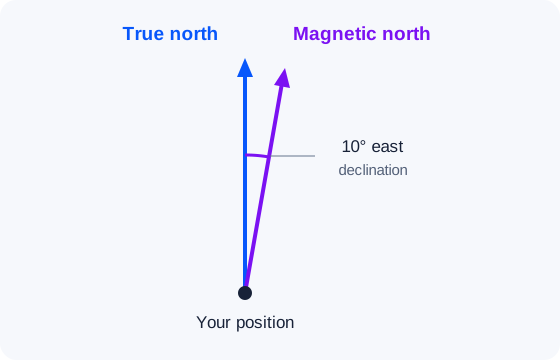
Magnetic north is the direction of the horizontal component of Earth's magnetic field at your position. True north points toward the geographic North Pole. The angle between them is magnetic declination, which varies with location and time.
Online Compass calculates that angle in your browser using the WMM2025 World Magnetic Model. Share your location or enter coordinates to convert between magnetic and true bearings. The label under the dial tells you which reference is being displayed.
For example, a magnetic heading of 80° with 10° east declination gives a true heading of 90°, due east. Learn more in our magnetic north and true north guide.
Reading your heading and accuracy
Your heading is the direction you point, measured clockwise from north: 0° or 360° is north, 90° is east, 180° is south, and 270° is west. A bearing is a direction you want to follow. Mark bearing holds that direction while the live compass shows your change in angle.
Heading accuracy and device tilt describe different things. The accuracy indicator uses the sensor's reported uncertainty when available. Otherwise, it estimates variation across recent readings. A smaller value means more settled readings, but magnetic interference can cause a steady, incorrect heading.
Device tilt shows how far the phone is from flat. Tilt compensation uses the device's orientation to calculate a horizontal heading, but holding your phone level makes readings easier to check. Keep it away from magnets, metal furniture, and electronics.
If the dial jumps or points the wrong way, follow our compass calibration guide. Check the north reference as well as the number before following a bearing.
Compass directions and degrees
Every compass direction is an angle measured clockwise from north. The dial shows both the number and the letters, so you can read your direction either way.
| Direction | Bearing | Direction | Bearing |
|---|---|---|---|
| North (N) | 0° | South (S) | 180° |
| Northeast (NE) | 45° | Southwest (SW) | 225° |
| East (E) | 90° | West (W) | 270° |
| Southeast (SE) | 135° | Northwest (NW) | 315° |
See all 16 points in the compass directions guide, or learn where north is from your location.
Compass on desktop vs. phone
To use a compass online for live direction, your device needs a magnetometer and a browser that provides north-referenced orientation readings. Support varies by phone, tablet, browser, and permission settings.
Most desktop computers and laptops cannot provide those readings. Opening the page or granting location access cannot add a compass sensor. You can still calculate the sun's bearing, Qibla direction, or local declination using your location or manually entered coordinates.
Frequently asked questions
Why does my Online compass need calibration?
Compass calibration helps your phone account for magnetic sensor errors. If the heading jumps or seems wrong, remove magnetic accessories, move away from metal and electronics, and gently move the phone in a figure-eight before checking again.
Does this work without an app?
Yes. Open Online Compass in your browser and allow motion or orientation access if prompted. No app download is needed; live readings require a compatible device with a magnetometer and a browser that makes north-referenced sensor data available.
Is this compass accurate?
Accuracy depends on your device, calibration, nearby magnetic interference, and how you hold the phone. The heading accuracy indicator uses a sensor-reported value when available or estimates how much recent readings vary; a steady reading can still be wrong near a magnet.
Where is north from my location?
Hold your phone flat with this page open and turn until the heading reads 0°. The top of your phone now points north. Without a compass sensor, use the sun compass, which calculates north from the sun's position at your location.
What are the compass directions in degrees?
North is 0°, east 90°, south 180° and west 270°. Northeast is 45°, southeast 135°, southwest 225° and northwest 315°.
Why doesn't my compass work on a laptop?
Most laptops lack a magnetometer that the browser can use, so they cannot supply a live north-referenced heading. You can still use the sun compass, Qibla calculator, and magnetic declination tool on a desktop by sharing your location or entering coordinates.